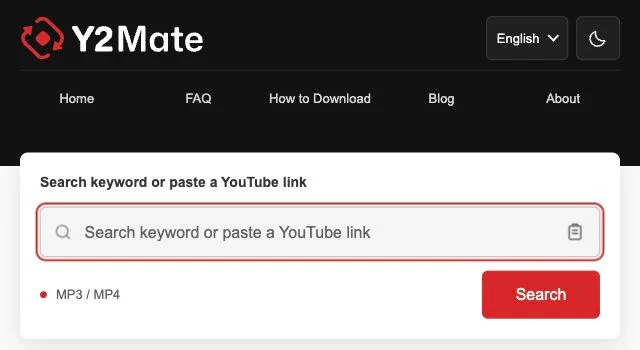
Search Keywords and Paste YouTube Links
One search field accepts either a music query or a YouTube Link. The clipboard button may ask for permission; if you prefer not to grant access, paste manually using your device's usual controls.

Welcome to Y2Mate, a browser-based YouTube downloader and converter for saving MP3 files and MP4 videos. Find a selection with keyword search or paste a YouTube Link to reach its available conversion choices. This YouTube Downloader brings discovery and file preparation into a browser workflow, so you can choose a suitable format before saving. Source access, service capacity and applicable restrictions determine which downloads are available.
The local chart is temporarily unavailable. Search for a title or artist above.




 Download

 Download

Type descriptive keywords into the search field and use Search, or paste a YouTube Link and use Convert. Keywords lead to matching videos; a recognized address opens the converter for that selection.
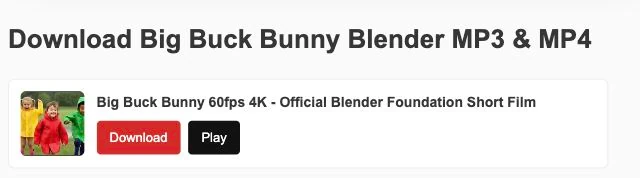
Confirm the video title and duration before choosing a format. Select MP3 when you only need listening, or MP4 when you need video, then choose from the qualities the conversion service offers.
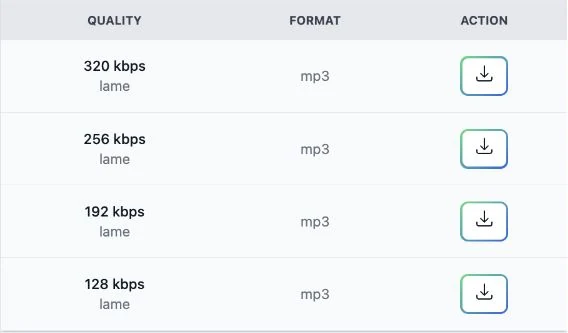
When preparation finishes, select Download and let your browser save the file. Follow any save-location prompt, and wait for the transfer to finish before opening the MP3 file or MP4 video.
One search field accepts either a music query or a YouTube Link. The clipboard button may ask for permission; if you prefer not to grant access, paste manually using your device's usual controls.
Explore Trending when you want to browse music rather than enter a title. Its Download control starts a song search, while Download on a related song takes that selection into conversion.
Switch between light and dark appearance to suit your surroundings. The browser layout keeps search and conversion controls accessible across screen sizes, although button placement and available space can differ on mobile.
A YouTube Mp3 Downloader is useful when the visuals add little to what you want to hear. MP3 320kbps, 256kbps and 128kbps may be available, depending on the source and conversion service options. For similar material, 128kbps uses less storage, 256kbps offers a middle setting, and 320kbps generally produces a larger file. A higher setting cannot restore missing detail. Choose an MP3 download that fits your listening needs rather than treating the largest bitrate as an improvement to the original.
Keep the visual instructions, movement or on-screen text by selecting MP4. A YouTube Mp4 Converter may offer HD choices such as 1080p and 720p, alongside 480p, 360p, 240p and 144p, depending on the source and converter. Lower resolutions can suit small-screen reference viewing, while fine text may need more detail. Compare the offered choices with your storage and connection; the MP4 label alone does not specify resolution, and individual videos may offer only some qualities.
Use keywords when you remember a song but not its exact video. Combine the artist with a distinctive title phrase, then compare the results instead of assuming the first match is correct. A known YouTube Link removes that selection stage and opens its converter directly. When copying from a message, include only the video's address so surrounding commentary does not interfere with recognition.
The Y2Mate Downloader runs in the browser without required software installation. Android browsers commonly show saved items in Downloads, with access also available through a file manager. On iPhone, check the browser's download indicator and the destination configured in Files. Desktop users can open the downloads panel to locate a saved item. Folder names and saving behavior vary, so check browser settings if the expected file is missing.
Recognized watch-page, shortened-share and embedded-video YouTube Links open conversion for one video at a time. Recognition identifies the address format; source availability and conversion success still depend on access and service conditions.
youtube.com/watch?v=VIDEO_IDyoutu.be/VIDEO_IDyoutube.com/shorts/VIDEO_IDm.youtube.com/watch?v=VIDEO_IDyoutube.com/embed/VIDEO_IDBrowser use involves both the page you visit and any third-party destination it opens, so safety cannot be assumed from a name alone. Keep browser updates and security protections enabled, and never share a password to obtain a file. Close suspicious advertisements, especially those presenting urgent device warnings. Decline unwanted installation prompts and unrelated permissions; a download should not require replacing your browser or adding unfamiliar software.
Separate a recognition problem from a preparation or saving problem. If a YouTube Link is rejected, check for missing characters and confirm that the intended video is accessible normally. If MP3 conversion stalls, read the error before retrying; temporary service availability may make waiting more useful than repeated requests. For a prepared file that will not save, inspect download permissions, connection stability and free storage without disabling browser safeguards.
Disclaimer: Y2Mate is an independently operated YouTube downloader and converter. It is not affiliated with, endorsed by, or sponsored by YouTube or Google. YouTube and related names belong to their respective owners. References to those services describe compatible links and do not imply an official partnership.
Download only content that you own or have permission to save. Follow the applicable licence conditions, including attribution where required, as well as copyright law and YouTube's Terms of Service. Personal or non-commercial use does not automatically grant permission to copy or redistribute someone else's content.
Choose Download Quality and Locate Saved Files
Before committing storage, compare the selected video's length and creator with the version you intended. A moderate bitrate may suit spoken material, while an MP4 tutorial needs enough resolution for readable labels. After saving, use the browser's download entry to find the actual folder, then give the file a descriptive name without changing its extension.
Y2Mate is a browser-based YouTube downloader and converter for MP3 and MP4. A search result or recognized YouTube Link identifies the video, after which the YouTube Converter presents available formats. File preparation depends on the source and the conversion service responding successfully.
Start with a keyword search or paste the video's YouTube Link, then verify that the selected video is the one you want. Choose MP3 and an offered bitrate, request conversion, and use Download when ready. The browser handles the final saving stage.
The website's browser workflow is free to use, but requests can be subject to usage limits or service restrictions. Data charges may apply through your connection provider. Advertisements and third-party offers can carry separate fees, so check their conditions before agreeing to any payment.
No installation is required to use the browser controls for search, conversion and saving. An app or extension promoted by another page is separate from that workflow. If a prompt insists on installing unfamiliar software, stop rather than treating it as a necessary download step.
On Android, begin with the browser's Downloads menu and use the file manager if needed. On iPhone, look in the browser's download list and its configured Files destination. Both use browser saving controls, but permission settings and browser versions can affect the experience.
The YouTube Mp3 Converter may provide MP3 bitrates of 320kbps, 256kbps and 128kbps; choices depend on the source and conversion service. Higher bitrate usually means a larger file, not recovered quality. Consider duration and storage, especially when the original material already has limited detail.
Select MP4 for material that depends on visuals, such as movement demonstrations or text shown on screen. Choose a resolution offered for that video rather than expecting a fixed quality. MP4 retains video, while MP3 is intended for listening and usually takes less storage.
An incomplete YouTube Link or extra copied punctuation can prevent recognition. Copy the address again from the intended video and try it without surrounding text. If the source is removed, private or restricted, a correctly recognized address still may not be available for conversion.
MP3 conversion can fail when the service is busy, the source becomes unavailable or a connection is interrupted. Check whether the error occurs during preparation or transfer. For preparation trouble, allow time before retrying; for transfer trouble, inspect the browser's download status and remaining storage.
Check that the saved file has the MP3 or MP4 type you selected, and avoid installers presented as media files. Keep browser security warnings active. Do not enter a password into a redirected page, and close advertisements that imitate system alerts or demand unrelated permissions.
Yes. No YouTube account or sign in is required for the search and conversion workflow. Your credentials are not needed to prepare a file. Content requiring special access may remain unavailable, and you should not supply account details to a page claiming to remove that restriction.
There is no single permission that overrides every condition. Consider copyright ownership or permission, applicable law, and YouTube terms separately. Authorization to save a file may not cover editing or redistribution. Check the rights for your intended use rather than assuming private use makes downloading lawful.